Skip to content
Photily Français Download

All your booths, run with your branding.

Set up events from your desk, follow your booths remotely and leave every event with contacts and bookings. The booth stays locked for guests and simple for your client. Try it free, with no time limit, then go Pro.

My Photily account: all your booths in one place.

One page to follow and control all your booths, whether they run on iPad, iPhone or Mac.

  • All your booths on one pageNewProStatus, remote control and alerts for every booth, without switching between them.
  • Your events from a browserSet up and edit your events from any computer.
  • No passwordYou sign in with a link sent by email.

Two ways to link a booth to your account

  1. On iPad, iPhone or Mac

    In the app: Settings › Remote control › “Link to my Photily account”.

  2. From the remote

    On an already linked phone, tap “Add to my Photily account”, or enter the code shown on your account page.

The account brings together Pro plan booths (iPad, iPhone and Mac).

Prepare at the desk, the booth follows.

Web management links your computer to your iPads. You set up the event calmly, and the booth arrives ready on site.

  • Your events on the computerNewProCreate and edit events in the browser: changes reach your iPads live.
  • All your files in one goNewBackgrounds, logos, layouts, sounds and welcome video, sent from the computer instead of one by one.
  • A true previewThe welcome screen and layouts as guests will see them, before you leave.
  • Contacts at handGuest form answers can be viewed and exported online.
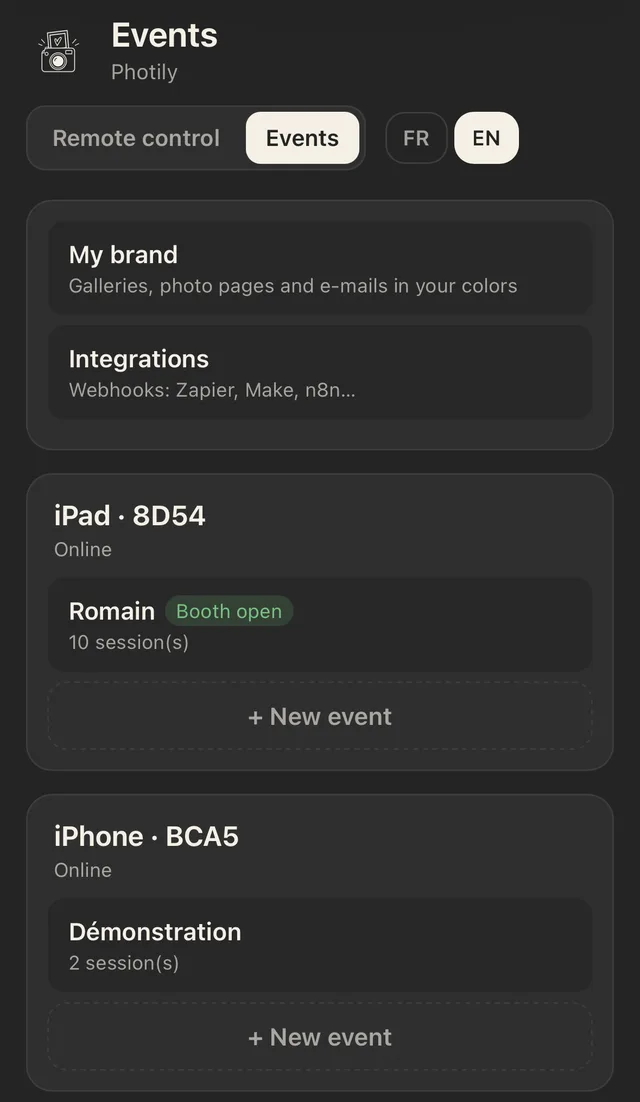
Photily Events page: My brand, Integrations, and the events of each linked iPad and iPhone, with the New event button
The Events page, here on a phone. It also opens on a computer.

All your booths, from your phone.

Several weddings on the same night? You see everything without moving.

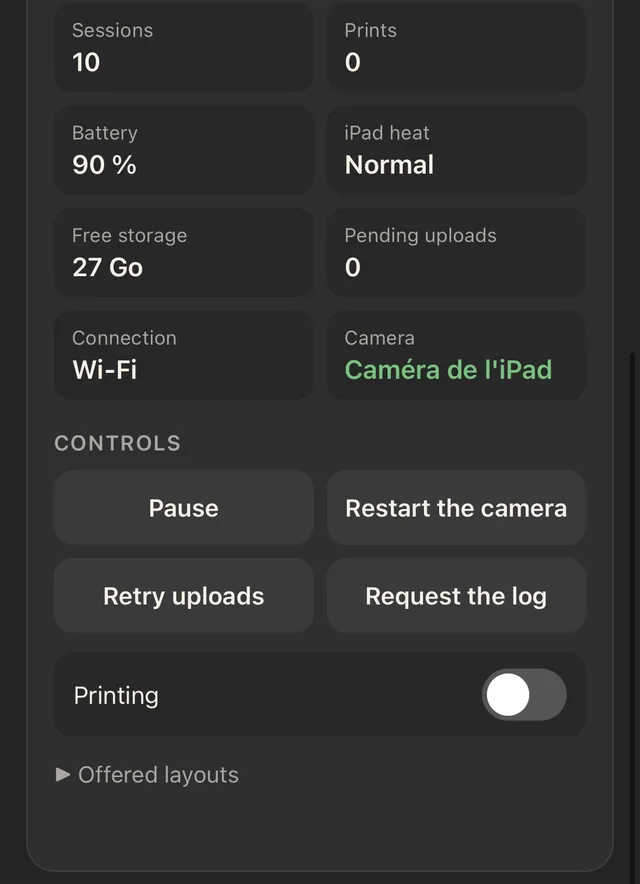
  • Each booth's statusProLast photo, sessions, prints, battery, iPad heat, storage, pending uploads, connection and camera in use, live.
  • Remote controlsPause the booth during dinner, restart the camera or uploads, turn printing off or on, pick the offered layouts.
  • Alerts on your phoneIn the Photily app, in a browser, or as an icon on the iPhone Home Screen to get alerts.
  • Up to 3 iPadsWith one Pro subscription, more on quote.
Photily remote control: sessions, prints, battery, iPad heat, storage, pending uploads, connection, camera, and control buttons
The remote control, live during the event.

Every gallery brings in bookings.

Today's guests are tomorrow's clients. With Pro, the gallery, every photo and the email sent to guests carry your branding.

  • Your logo and coloursNewProOn the gallery, each photo page and the email to guests. Photily stays as a small credit.
  • White labelNewProNo mention of Photily on the guest side: only your brand shows, on the booth and on the gallery.
  • The “Book this booth” buttonIt leads to your website or contact page, right when guests are looking at their photos.
  • Your messageA thank-you, an offer, your social accounts: your choice.

Trade shows and corporate events: every photo becomes a contact.

On a stand or at a company party, Photily collects the contacts your client expects, by the rules.

A custom formNew

Name, email, phone and your client's own questions, before or after the photo.

Consent built in

A consent box, and a marketing box that is never pre-ticked.

CSV export and online copy

A file ready to hand to your client. With Pro, a copy you can view from web management.

Sent to the CRMNewPro

Every photo and every contact go automatically to Zapier, Make, n8n or the CRM, account-wide or per event.

Locked for guests, simple for your client.

  • Locked boothGuided Access, operator code, secret exit corner and progressive lockout after wrong codes.
  • Host modeA separate code for your client on site: pause the booth with a dark screen and a camera you can switch off, scheduled sleep, paper reload.
  • Automatic resumeIf the app is closed or the iPad restarts, the booth goes straight back to the current event.
  • Client sheet PDFInstructions, host code and your phone number, ready to print and laminate.

During the event, Photily keeps watch.

Guests only see the booth. Useful information goes to the host, without interrupting the party.

  • Pre-event check
  • Camera
  • Printers
  • Online gallery
  • Battery
  • Storage
  • Guided Access
  • Monitoring during the eventiPad temperature and storage are watched all evening, with discreet alerts for the host only.
  • The camera reconnects on its ownAfter sleep or power-off, the connection comes back by itself. Guests see “The booth is getting ready…” in the meantime.
  • The iPad camera takes overWith no camera plugged in, the party carries on with the iPad camera.
  • Paper counterThe host is told when paper runs low, before the roll ends.

After the event, everything is filed.

Event report PDF

Sessions, prints and shares, to hand over to your client with the invoice.

Statistics and contacts

Export the addresses guests chose to leave, to pass on to your client.

Encrypted backup

Events and settings backed up with a password, and movable from one iPad to another.

Shared layouts

Design a layout once, send it to all your booths or to a partner operator.

A layout for every client, no computer needed.

Your client sends you their template, or you design it together during the meeting: everything is prepared on the iPad, in minutes.

  • The client's template, imported as isA PNG received by email or saved in your files: photos drop into the transparent windows on their own.
  • Or designed on the spotMillimetre-precise editor, text, logos and automatic fields for the name and date.
  • Sent to all your boothsShare the layout to your other iPads or to a partner operator.
See layouts

More extras to sell.

Every feature in the app can become a line on your quote.

  • Slow-motion video clips
  • GIF
  • Boomerang
  • Video guest book
  • Contact capture
  • Sharing station
  • Live props
  • Virtual background
  • Thermal tickets
  • Photo stickers
  • Repeated photo
  • QR gallery

What does each event cost you?

Enter your number of events per month to compare plans.

4 per month

Cost by plan
PlanPer eventPer month
Party Pass€9.99€39.96
Pro monthly€2.50€9.99
Pro yearly€1.85€7.42

Pro yearly is paid in one go: €89 a year. A Pass covers 1 event on 1 iPad; Pro covers up to 3 iPads. Prices include VAT.

Pro plans

Try Photily free, with no time limit: the free version is complete, with no watermark and with ads, for one event at a time. Pro removes the ads and adds unlimited events, up to 3 iPads, remote management, the QR gallery and galleries with your branding.

Pro monthly

€9.99 / month

To get started or try it for a season.

  • Unlimited events, up to 3 iPads
  • No ads
  • QR gallery kept for 60 days, email and WhatsApp
  • Web event management and remote control
  • Galleries and emails with your branding, or white label
  • Online copy of contacts and integrations (webhooks)
  • No commitment

On the App Store

Recommended plan

Pro yearly

€89 / year

That's about €7.42 a month.

  • Everything in Pro monthly: no ads, 3 iPads, web management, remote control, your branding, integrations
  • QR gallery kept for 60 days
  • A quarter off compared with monthly
  • One payment a year

On the App Store

Pro custom

On quote

For operators running more than 3 booths.

  • More than 3 iPads
  • Unlimited events
Contact us

Prices include VAT. Purchases and subscriptions are made through the App Store. Pro subscriptions renew automatically unless cancelled at least 24 hours before the end of the current period, from your Apple Account settings. Payments and refunds are handled by Apple; billing is per Apple Account. Terms of use (Apple licence agreement) · Privacy policy (in French). · Terms of sale (in French).

Guests' data, well looked after.

You stay in control of your events' photos. Photily makes life easier with your clients and their guests.

A private gallery, for a limited time

Only reachable through its QR code, not indexed, and deleted automatically on the date shown.

One photo, removed everywhere

A guest asks for a photo to be removed? Delete it on the iPad: it is also removed from the online gallery.

Emails only with consent

Guests choose to leave their address. Sending goes through our servers without keeping it. If you turn on the online copy of form answers, it is deleted automatically after 30 days by default, 60 at most.

Faces never identified

Props and virtual backgrounds are processed on the iPad. No face is recognised, stored or sent.

Stored in Europe

Gallery, settings and form copies are stored in the European Union and deleted when they expire.

Integrations under your control

Webhooks only send what you turn on, to the tool you choose. You remain responsible for that tool.

Details are in our privacy policy (in French).

Photo booth operators, try Photily on your booth.

Photily is free on the App Store, with no watermark and no time limit. Install it on your iPad and try it with your own gear. Your clients can try it for free too before booking you.

Download on the App Store

Operator questions

Can I try Photily before subscribing?

Yes, for free and with no time limit: all shooting and printing, with no watermark, for one event at a time. The free version shows ads (never during the photo) and does not send photos by QR code, email or WhatsApp. Pro removes the ads as soon as you subscribe. Where do ads appear?

What is white label?

With Pro, you can remove every mention of Photily on the guest side: only your brand shows. Your clients see your booth, not our software.

How many iPads with a Pro subscription?

Up to 3 iPads signed in with the same Apple Account, to run several booths on the same night. Beyond that, contact us for a custom quote.

Can my client change the booth settings?

No. The host code only opens pause, sleep and paper. Settings stay protected by your operator code.

Can I reuse my current PNG overlays?

Yes. Import them as they are: Photily drops the photos into the transparent windows, automatically.

Can I put my logo on the galleries?

Yes, with Pro. Set your logo, colours, message and the address of the “Book this booth” button under “My branding” in web management.

How do I send contacts to my CRM?

Under “Integrations”, paste the receiving address (webhook) provided by your automation tool or CRM, then tap “Send a test”. Every photo and every contact then follow automatically, account-wide or for one event. With Zapier, for example: “Webhooks by Zapier” trigger, then “Catch Hook”. Make and n8n work the same way. Zapier, Make and n8n are trademarks of their respective owners; Photily is not affiliated with or endorsed by these services.

Can my phone be the remote control?

Yes. Link your phone to the iPad, then follow your booths in Photily on iPhone or in the browser. To get alerts on iPhone, add the remote to your Home Screen (Share, then “Add to Home Screen”). The “Link a computer” button opens the same management on your computer.

How do I delete my Photily account?

Sign in at galerie.photily.fr/compte and use the “Delete my account” button. If you do not sign in for 400 days, the account is also deleted automatically.

How do I cancel my subscription?

From your Apple Account settings, at least 24 hours before the end of the current period. Pro monthly has no commitment.
Download